
Spintax helps you automatically generate multiple variations of your email content, making your outreach feel more natural and improving deliverability.
Instead of sending the same email to every prospect, Spintax allows you to randomize words, phrases, or sentences.
What is Spintax?
Spintax (spinning syntax) lets you define multiple variations inside curly brackets {} separated by pipes |.
Example:
{Hi | Hello | Good morning} {{First Name}}Outboundry will randomly pick one option for each email, such as:
Hi Ravi
Hello Ravi
Good morning Ravi
Why Use Spintax?
Avoid repetitive emails across prospects
Improve inbox placement and deliverability
Make emails feel more human and personalized
Reduce chances of spam filtering
How to Add Spintax
Option 1: Use the Spintax Button (Recommended)
Open your email step in a sequence
Click on “Spintax” in the editor
Choose from pre-built spintax options (e.g., greetings, closings)
Insert it directly into your email
You can also:
Click “Insert new spintax”
Create your own variation
This will be saved as My Spintax and will be available in the dropdown
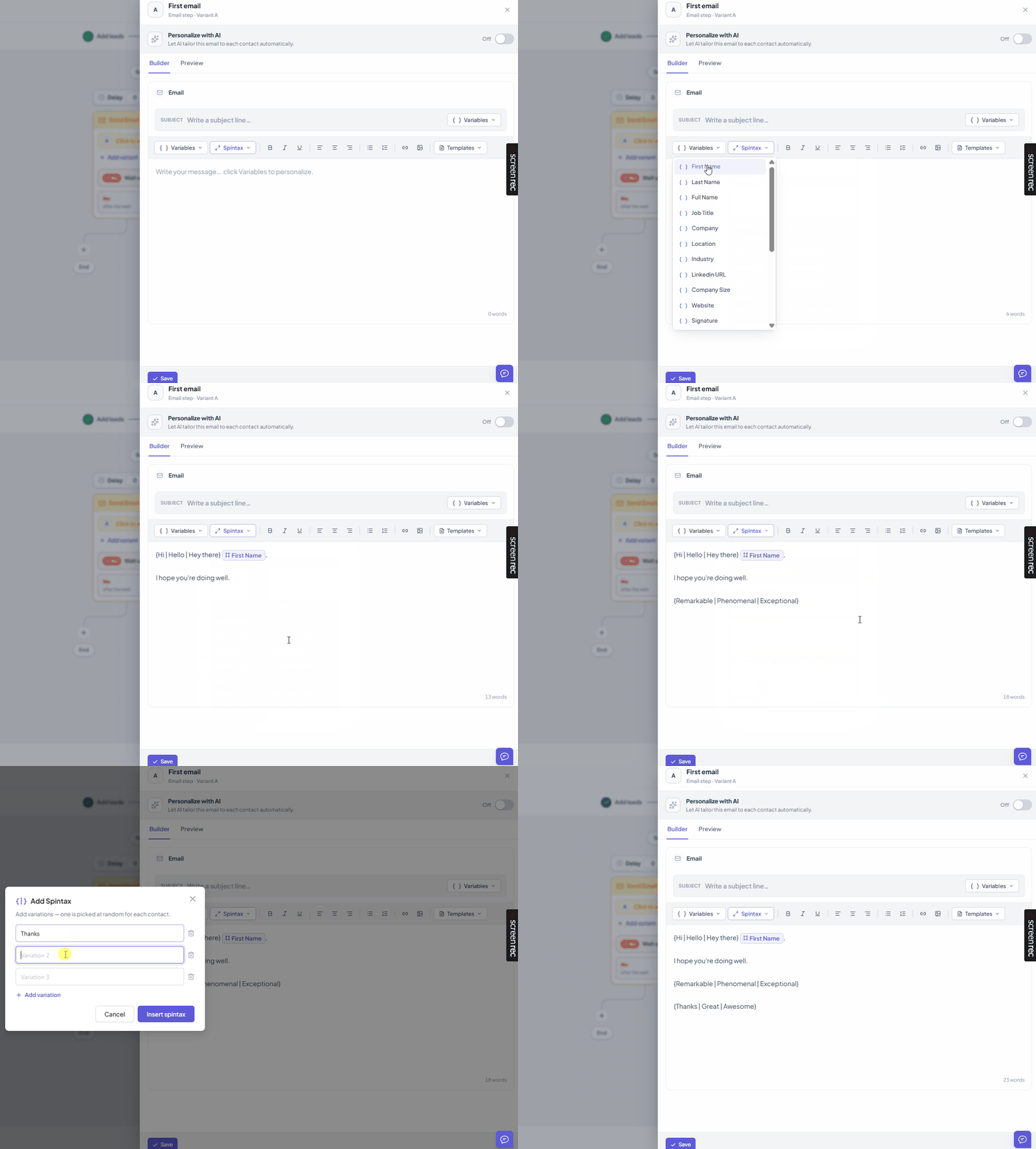
Option 2: Write Spintax Manually
You can type Spintax directly in the editor using this format:
{option 1 | option 2 | option 3}Example:
{I wanted to reach out | Just checking in | Thought I'd connect}Where Can You Use Spintax?
You can use Spintax anywhere in your email:
Opening lines
Body content
CTAs
Closing lines
How It Works
Each email sent gets a random variation
Spintax is resolved at the time of sending
Different parts of your email can have separate spintax blocks
Example:
{Hi | Hello} {{First Name}},

{I came across your profile | Saw your company recently}

{Would love to connect | Open to a quick chat?}
This can generate dozens of unique combinations automatically.
Best Practices
Keep variations natural and realistic
Avoid overusing too many variations in one email
Focus on high-impact sections (opening + CTA)
Combine with personalization (like
{{First Name}})
Pro Tip 💡
Start simple:
Add spintax to your greeting and first line
Gradually expand to the rest of the email
This gives you the biggest deliverability boost with minimal effort.