
AI Personalization helps you generate highly personalized outreach messages for every prospect. Instead of sending the same email or LinkedIn message to everyone, Outboundry uses AI to create unique messages based on your product information and each prospect's profile.
You only need to configure your product once. After that, you can enable AI Personalization on any email, LinkedIn message, or InMail step in your campaigns.
What AI Personalization can do
With AI Personalization, you can:
Generate personalized cold emails.
Generate personalized LinkedIn messages.
Generate personalized InMails.
Generate personalized LinkedIn connection notes
Tailor messages based on each prospect's profile.
Control the tone, language, message length, and campaign goal.
Choose from multiple AI models.
Preview AI-generated sample messages before launching your campaign.
Before you begin
Before using AI Personalization, you'll need to configure your product information.
The AI uses this information to understand:
What your product does
Who it's for
The problems it solves
Why prospects should care
The better your product information, the better your personalized outreach will be.
Step 1: Configure your product
Navigate to:
Settings → AI Personalization
Click Add Product.
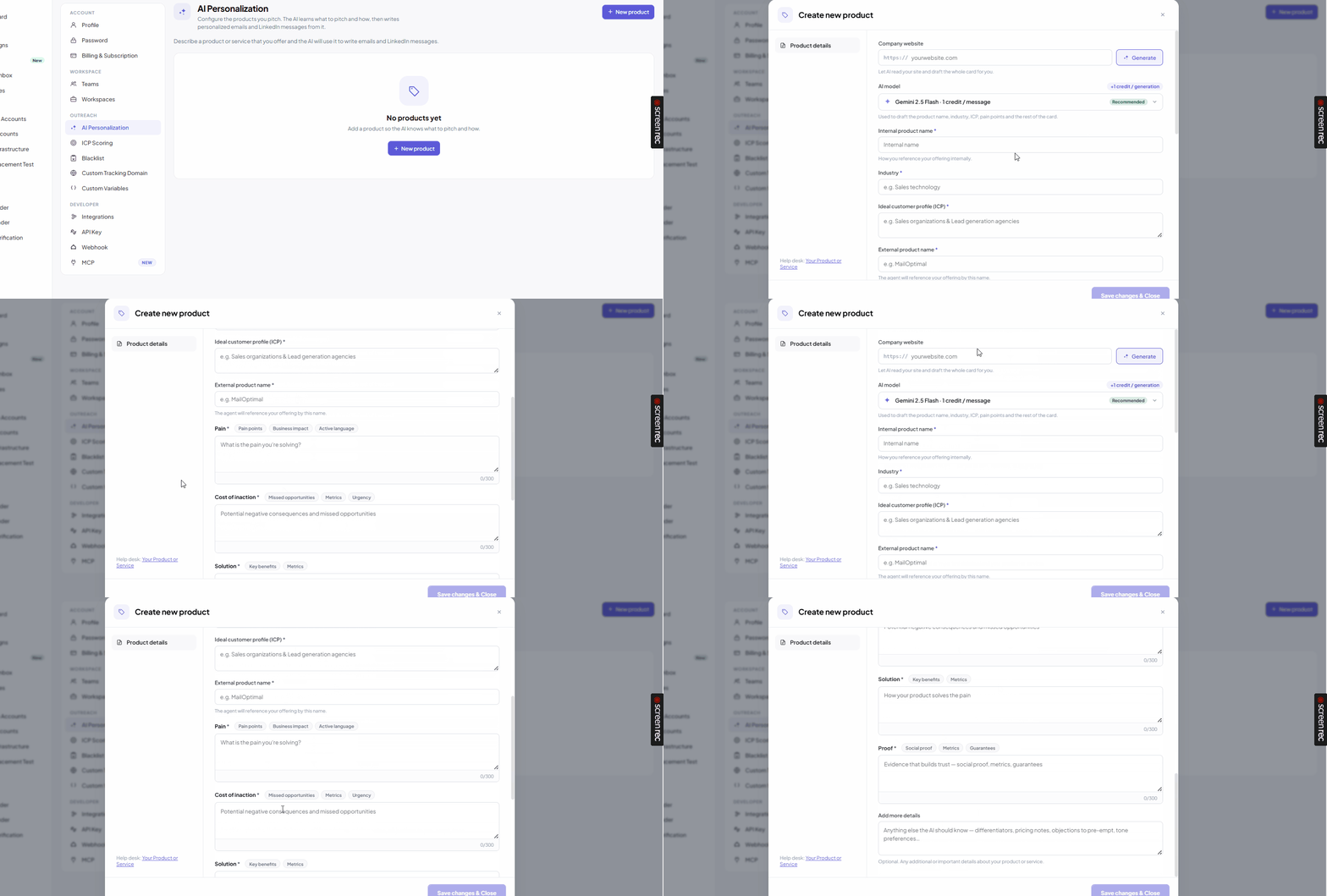
Fill in the following information.
Product Name
Provide your product name.
You can also specify:
Internal product name
Public product name
Website
Industry
Ideal Customer Profile (ICP)
This helps the AI understand what you're selling.
Pain Points
Describe the challenges your target customers face.
Instead of writing generic statements, explain the real business problems your product solves.
Example:
Sales teams struggle with low reply rates.
SDRs spend too much time personalizing emails manually.
The more specific you are, the better the AI can personalize messages.
Cost of Inaction
Explain what happens if the customer doesn't solve this problem.
Examples include:
Lost revenue
Poor productivity
Missed sales opportunities
Increased operational costs
Helping the AI understand the business impact leads to stronger messaging.
Solution
Describe how your product solves those problems.
Focus on:
Key features
Benefits
Outcomes
Rather than listing every feature, explain why customers choose your product.
Proof
Add evidence that supports your claims.
Examples include:
Customer success stories
Testimonials
Case studies
Performance metrics
Awards
Social proof
Providing proof helps the AI generate more credible outreach.
Product quality indicators
As you complete each section, Outboundry evaluates the quality of your product information.
You'll see indicators showing whether your content sufficiently covers areas such as:
Pain points
Business impact
Solution
Proof
For the best results, complete every section before creating campaigns.
Step 2: Enable AI Personalization in a campaign
Open or create a campaign.
AI Personalization is available for:
Email steps
LinkedIn Message steps
InMail steps
Open the message editor and enable AI Personalization.
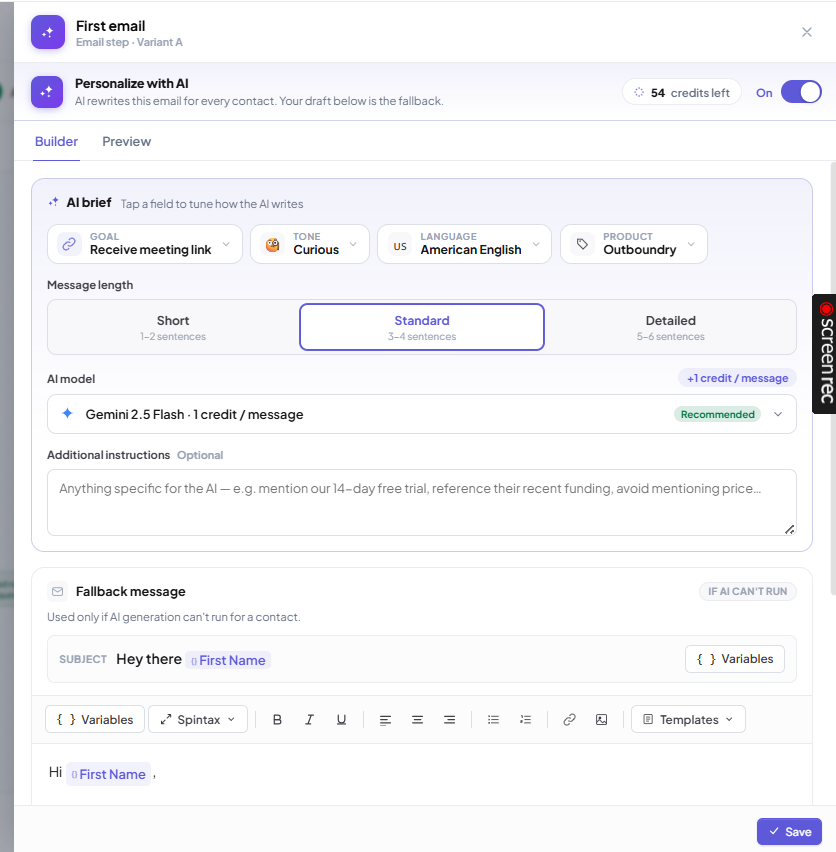
Step 3: Configure AI settings
Once AI Personalization is enabled, you can customize how messages are generated.
Select your Goal
Choose what you want the message to achieve.
Available goals include:
Start a conversation
Receive a meeting link
Send a meeting link
Request a referral or introduction
Your selected goal influences how the AI structures the message.
Select your Product
If you've configured multiple products, choose the one you want the AI to use for this campaign.
Choose the Language
AI Personalization supports multiple languages.
Simply choose your preferred language from the dropdown.
Examples include:
English
Spanish
French
German
Hindi
Japanese
Arabic
This allows you to personalize outreach for international prospects.
Choose the Tone
Select the writing style that best matches your outreach strategy.
Available tones include:
Curious
Friendly
Professional
Direct
Enthusiastic
Empathetic
Confident
Different campaigns may perform better with different tones.
Select the Message Length
Choose how detailed the generated message should be.
Available options:
Short – 1–2 sentences
Standard – 3–4 sentences
Detailed – 5–6 sentences
Choose an AI Model
Outboundry supports multiple AI models.
Different models consume different numbers of AI credits.
Choose the model that best fits your balance and quality requirements.
Tip: If you're unsure which model to use, start with the recommended model for the best balance between quality and credit usage.
Add Additional Instructions (Optional)
You can provide custom instructions to influence message generation.
Examples:
Mention a recent funding announcement.
Keep the message under 80 words.
Avoid using emojis.
Focus on ROI.
These instructions are applied alongside your product information.
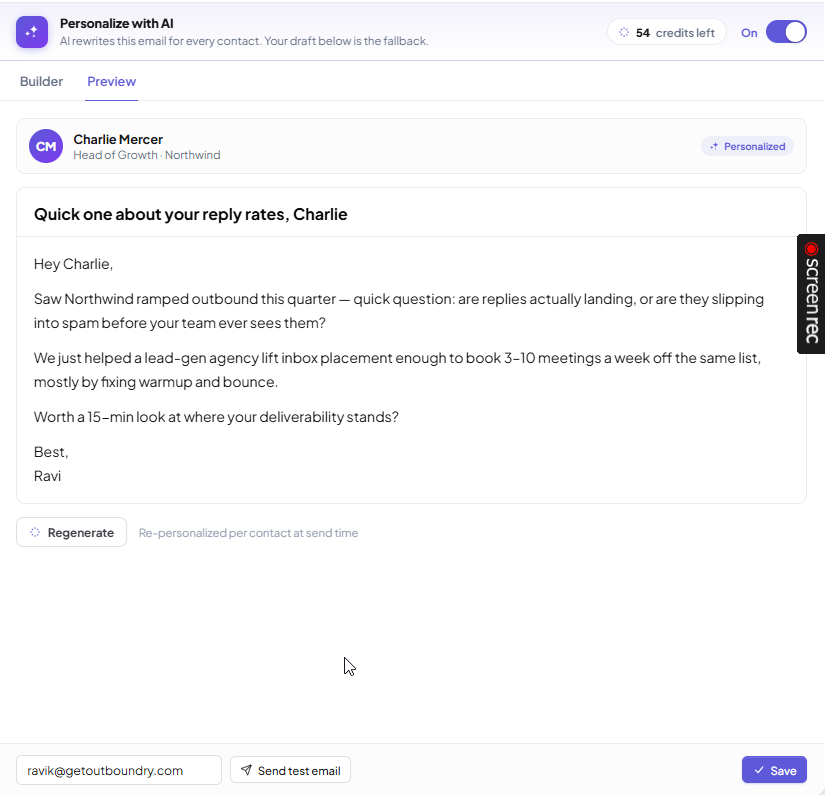
Step 4: Preview AI-generated messages
Before launching your campaign, preview how AI will personalize messages.
Select:
A sample prospect
A sender account
Outboundry generates a preview using real prospect information so you can review the final output before sending.
Step 5: Launch your campaign
Once you're happy with the generated messages:
Review your campaign.
Launch it.
During campaign execution, Outboundry generates a unique message for every prospect using the selected AI settings.
AI Credits
Every AI-generated message consumes AI credits.
The number of credits used depends on the selected AI model.
Some models prioritize speed and lower credit usage, while others focus on generating higher-quality responses.
You can monitor your remaining AI credit balance within your workspace.
What happens if AI can't generate a message?
If AI is temporarily unable to generate a personalized message, Outboundry automatically uses fallback message that you configure while setting up the AI personalized message.
This ensures your campaign continues running without interruption.
Best Practices
To achieve the highest-quality AI personalization:
Fully complete your product profile.
Clearly explain your customer's pain points.
Include measurable outcomes whenever possible.
Add customer proof and testimonials.
Upload relevant knowledge base documents.
Preview messages before launching large campaigns.
Experiment with different goals and tones.
Keep additional instructions clear and specific.
Frequently Asked Questions
Do I need to configure a product before using AI Personalization?
Yes. AI Personalization relies on your product information to generate relevant outreach. You must configure at least one product before enabling AI in your campaigns.
Can I use AI Personalization for both LinkedIn and email campaigns?
Yes. AI Personalization works with:
Cold Emails
LinkedIn Messages
LinkedIn InMails
You can also use it in multi-channel campaigns.
Can I preview AI-generated messages?
Yes. Before launching your campaign, you can preview generated messages using a sample prospect and sender account.
Which AI model should I choose?
The best model depends on your priorities.
If you're looking for a balance between quality, speed, and credit usage, start with the recommended model. You can experiment with other models based on your campaign requirements.
Does every message use AI credits?
Yes. Every AI-generated message consumes AI credits based on the selected model.
What if AI fails to generate a message?
Outboundry automatically sends a fallback personalized message so your campaign continues without interruption.
Can I generate messages in different languages?
Yes. AI Personalization supports multiple languages, making it easy to personalize outreach for prospects across different regions.
Can I customize how the AI writes?
Yes. You can control the message goal, tone, language, length, AI model, and provide additional instructions to tailor the generated output to your campaign.