How to Import Leads from LinkedIn Recruiter Search into Outboundry
Outboundry allows you to import leads directly from your LinkedIn Recruiter / Recruiter Lite search results and instantly use them in your outreach campaigns.
This enables recruiting teams, staffing agencies, and outbound teams to convert high-quality Recruiter searches into scalable outreach campaigns without manual exports.
✅ Prerequisites
Before you begin, make sure:
You have an active LinkedIn Recruiter or Recruiter Lite account.
Your LinkedIn account is already connected to Outboundry.
You have an active Recruiter search ready with filters applied.
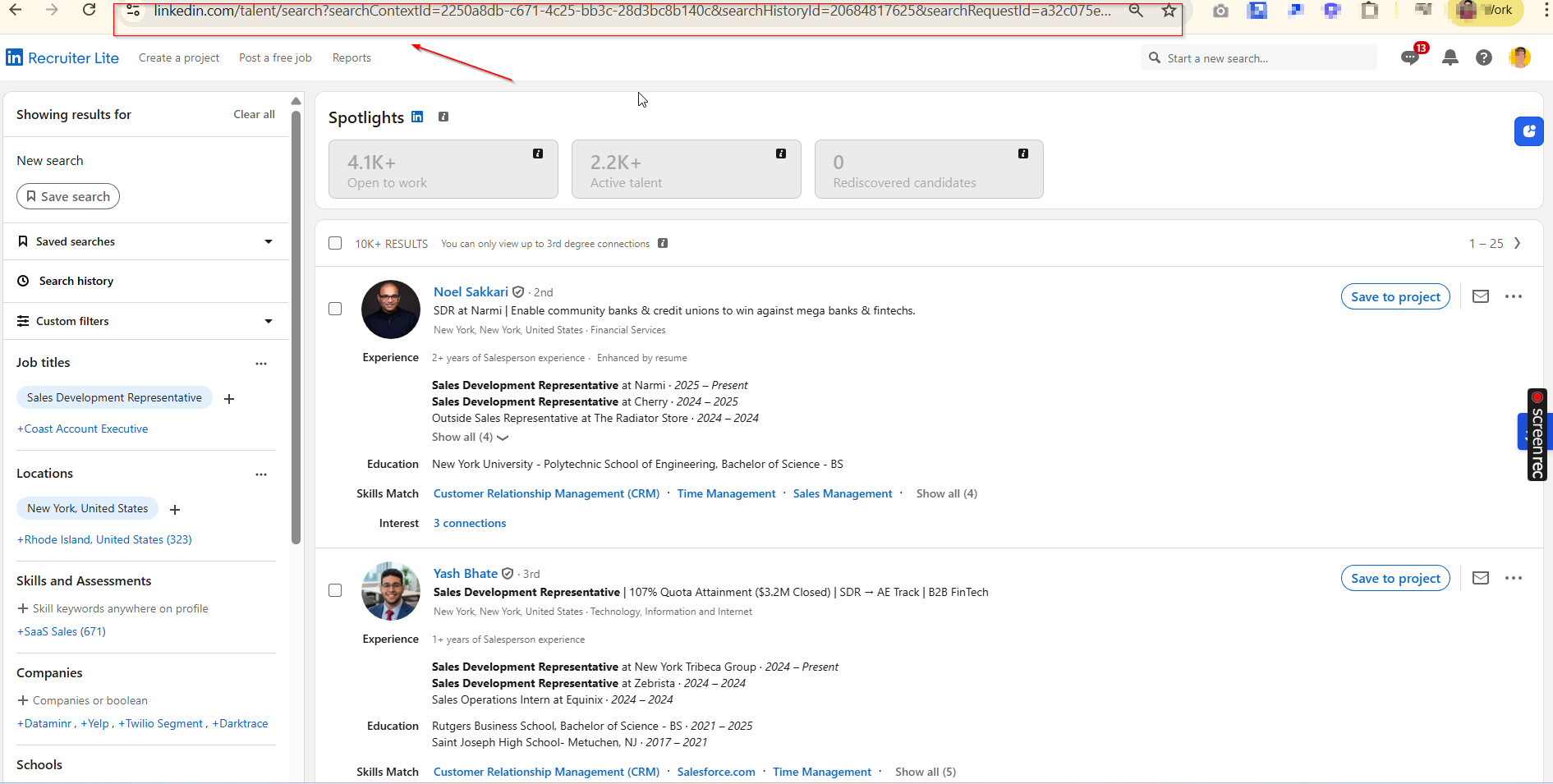
Copy the full URL exactly as shown in the browser.
Step 3: Paste the URL into Outboundry
Log in to your Outboundry dashboard.
Go to Campaigns.
Open an existing campaign or create a new one.
Click Add Leads → Select Import from LinkedIn Recruiter Search.
Paste the copied Recruiter search URL.
Click Import Leads.
Outboundry will automatically start fetching leads from your Recruiter search results.
Step 4: Review Imported Leads
After the import completes:
All imported profiles will appear in your campaign’s Leads tab.
Outboundry automatically captures:
Full name
LinkedIn profile URL
Current role
Company
Location
Headline (if available)
You can now:
Assign these leads to sequences
Personalize outreach
Start automation
⚡ Important Notes & Best Practices
✔ Search Size & Pagination
Outboundry automatically scrolls through multiple pages of Recruiter results and imports leads safely.
Tip: Narrow down filters to improve targeting and reduce unnecessary imports.
✔ LinkedIn Safety Limits
LinkedIn enforces usage limits. Large imports may take time and are processed gradually to maintain account safety.
✔ Duplicate Handling
Outboundry automatically prevents duplicate leads across campaigns and workspaces.
✔ Supported Account Types
This import method supports:
✅ LinkedIn Recruiter
✅ LinkedIn Recruiter Lite
If you're using standard LinkedIn or Sales Navigator, use the respective import options.
❓ Troubleshooting
🔹 Import doesn’t start
Ensure the copied URL is from the Recruiter search page.
Confirm you are logged into LinkedIn in the same browser.
Refresh Outboundry and retry.
🔹 No leads imported
Verify that the search contains visible results.
Some profiles may be restricted based on Recruiter permissions.
Try importing a smaller search first.
🔹 Authentication or session errors
Reconnect your LinkedIn account in Outboundry.
Make sure LinkedIn session is active.
🙌 Need Help?
If you encounter any issues while importing from Recruiter search, reach out via in-app chat or contact our support team. We’re happy to help you get started 🚀